Docs menuQuickstart
On this page5 sections
Shell quickstart
A shell is a web page that draws the desktop. Each window is an <app>
element: put it where the window goes and style it with CSS. Write it in React
or in plain JavaScript.
1. Install Domicile
Install it from your distribution's packages or Nix: Install.
2. Write a shell
shell.tsx, anywhere:
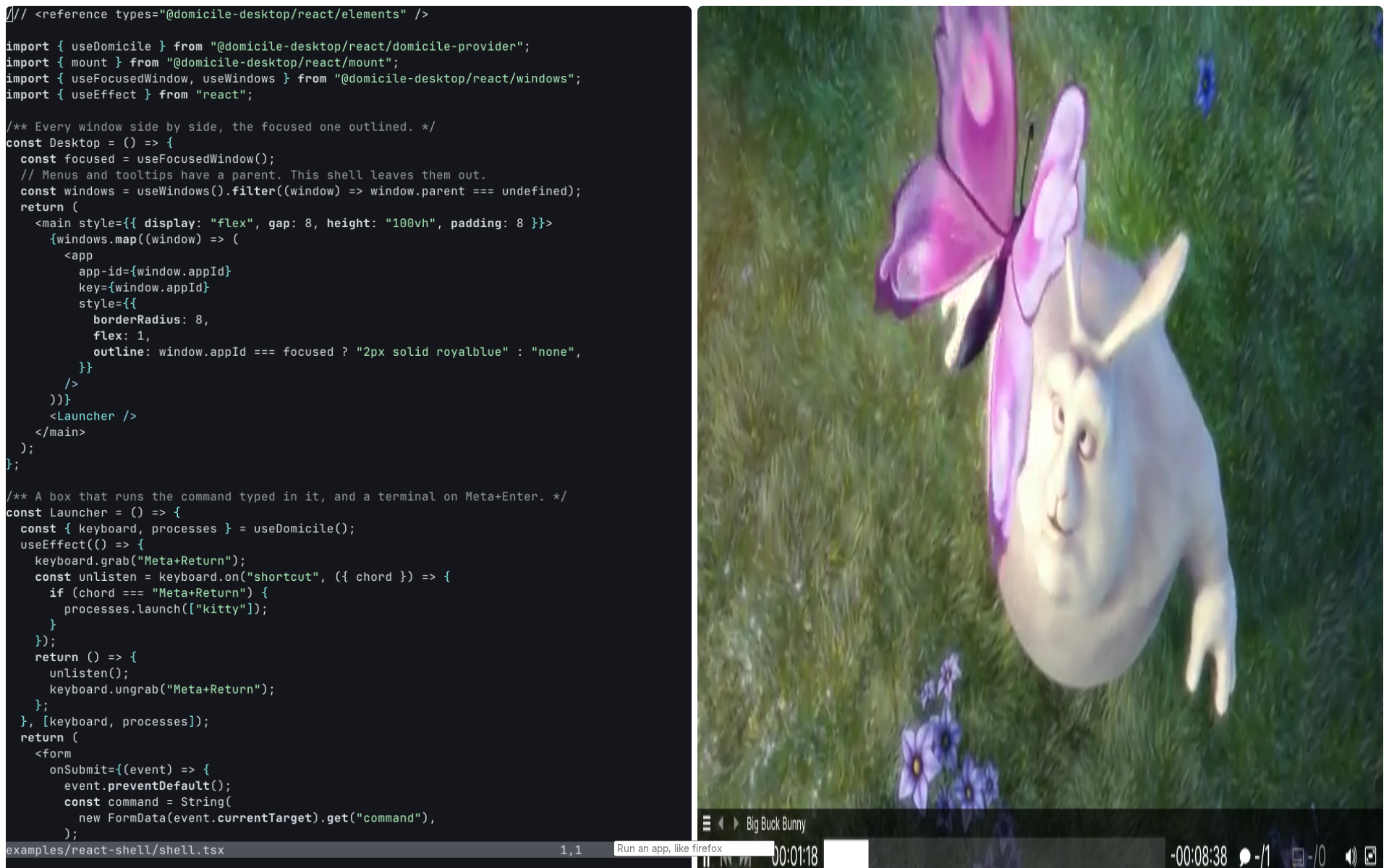
/// <reference types="@domicile-desktop/react/elements" />import { useDomicile } from "@domicile-desktop/react/domicile-provider";import { mount } from "@domicile-desktop/react/mount";import { useFocusedWindow, useWindows } from "@domicile-desktop/react/windows";import { useEffect } from "react";/** Every window side by side, the focused one outlined. */const Desktop = () => { const focused = useFocusedWindow(); // Menus and tooltips have a parent. This shell leaves them out. const windows = useWindows().filter((window) => window.parent === undefined); return ( <main style={{ display: "flex", gap: 8, height: "100vh", padding: 8 }}> {windows.map((window) => ( <app app-id={window.appId} key={window.appId} style={{ borderRadius: 8, flex: 1, outline: window.appId === focused ? "2px solid royalblue" : "none", }} /> ))} <Launcher /> </main> );};/** A box that runs the command typed in it, and a terminal on Meta+Enter. */const Launcher = () => { const { keyboard, processes } = useDomicile(); useEffect(() => { keyboard.grab("Meta+Return"); const unlisten = keyboard.on("shortcut", ({ chord }) => { if (chord === "Meta+Return") { processes.launch(["kitty"]); } }); return () => { unlisten(); keyboard.ungrab("Meta+Return"); }; }, [keyboard, processes]); return ( <form onSubmit={(event) => { event.preventDefault(); const command = String( new FormData(event.currentTarget).get("command"), ); const argv = command.split(" ").filter(Boolean); if (argv.length > 0) { processes.launch(argv); } event.currentTarget.reset(); }} style={{ bottom: 16, left: "50%", position: "fixed", translate: "-50%" }} > <input name="command" placeholder="Run an app, like firefox" /> </form> );};export const Shell = mount(Desktop);mount(Desktop)is the shell: Domicile calls it with the desktop.useWindows()is every window, and rerenders when one opens or closes.<app app-id>shows that window. A click on it gives it the keyboard.Launcherstarts apps: type a command in the box at the bottom, such asfirefox, and press Enter. Meta+Enter openskitty; change it to your terminal.keyboard.grabtakes the chord from apps.
3. Run it
domicile ./shell.tsxDomicile builds it, with React and @domicile-desktop/* from its own
install. There is no project to set up.
- In a desktop session it opens in a window; from a console login it takes the screen.
- It prints
XDG_RUNTIME_DIRandWAYLAND_DISPLAY. Start an app with both set and it opens on your shell.
4. Change it
Edit the shell, then, in a terminal on the desktop:
domicile load-shell ./shell.tsxWindows stay open across the reload.
For your editor's types, install the packages beside it:
bun add -d @domicile-desktop/react@next @domicile-desktop/sdk@next @types/reactNext
- Start from manganese instead of from nothing.
- How a shell works: windows, popups, focus, keys, options.
- Hooks: displays, theme, idle, lock, portals.
- Browser windows are
<webview>s. - Dialogs: this shell draws
none, so an app that asks for a file picker or a screen share waits. Mount
<PortalDialogs />to draw them all, or refuse them. - Ship it: bundle and distribute your shell.
- This shell is
examples/react-shellin React andexamples/vanilla-shellin JavaScript.